
Your site isn't just one thing. Your software shouldn't be either.
Containers, storage rooms, workshops, yard space — UnitLet runs all of them from one login. It's made for the laptop or PC in the office, where the leases, the rent reviews and the estate valuation actually get done, and the same account carries on to your tablet in a meeting and your phone out on the estate.
£39 a month per account 30 days free · no card needed
Founding offer: the first ten businesses pay £29 a month for their first 12 paid months, then £39 a month.
The demo is a real account full of invented tenants. No signup, no email address.
- Every kind of unit on one login
- Proper leases and monthly licences together
- MEES built in: an F or G unit can't be listed
- Holding over under the 1954 Act is recognised
Your whole estate, on the screen in the office.
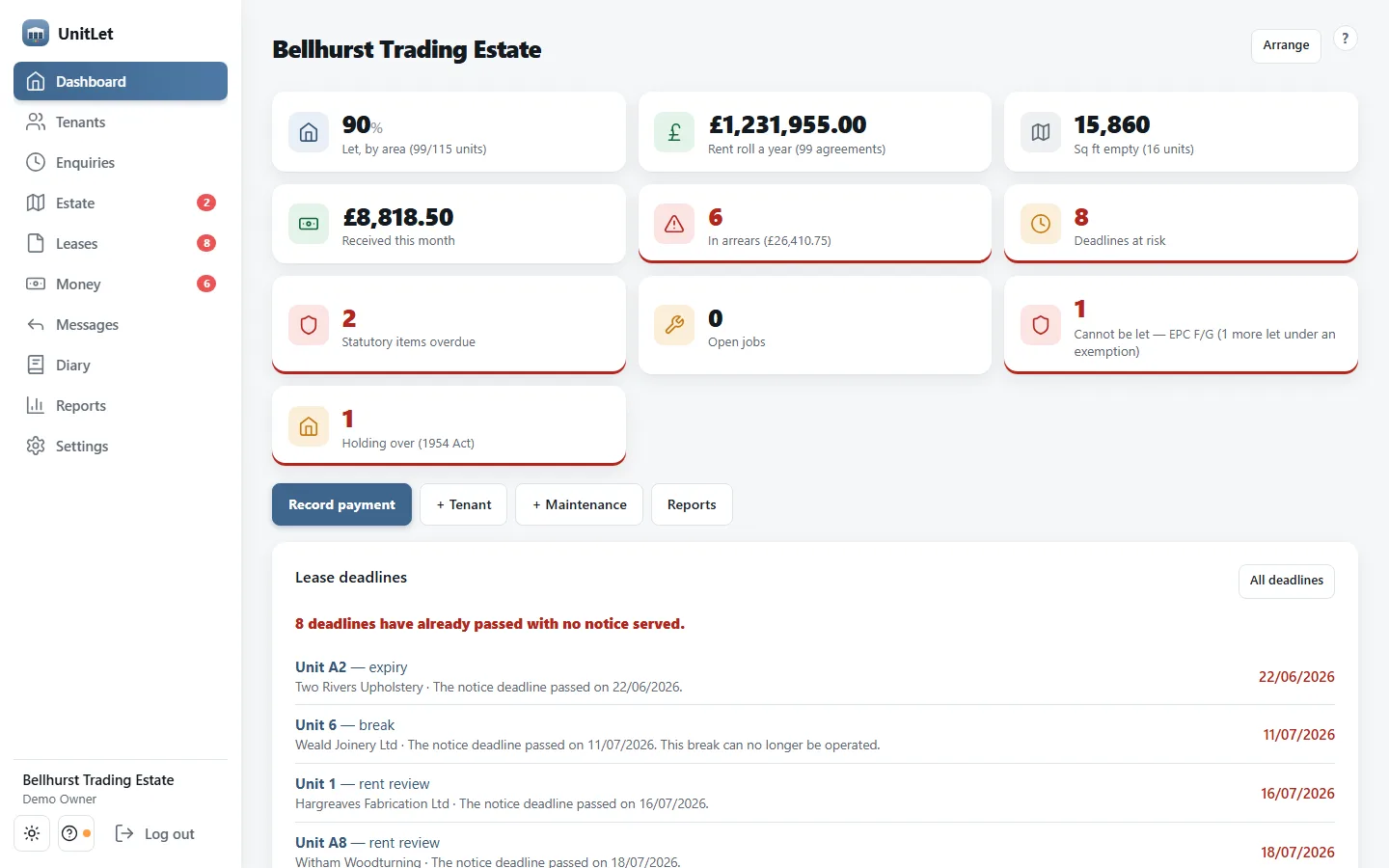
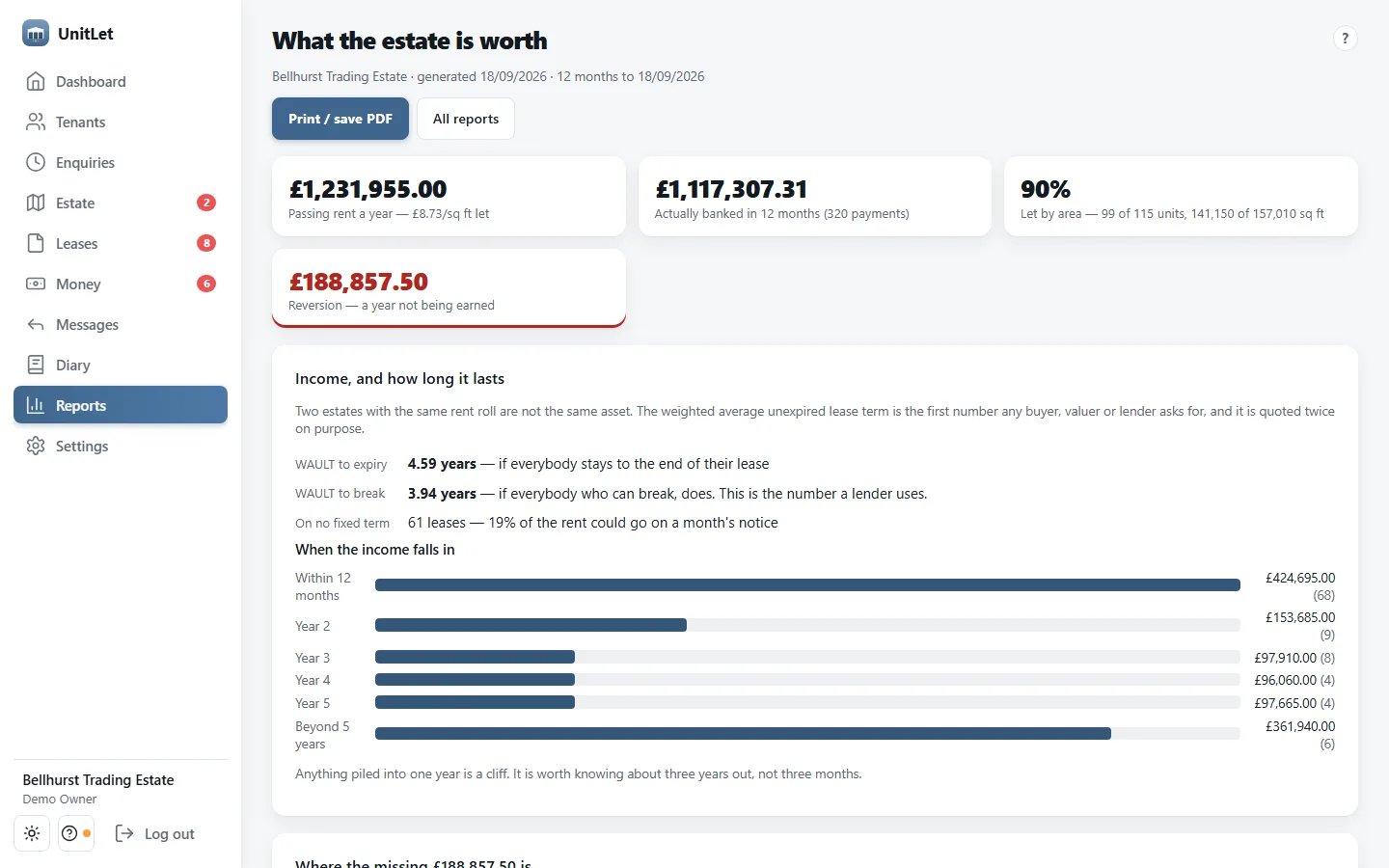
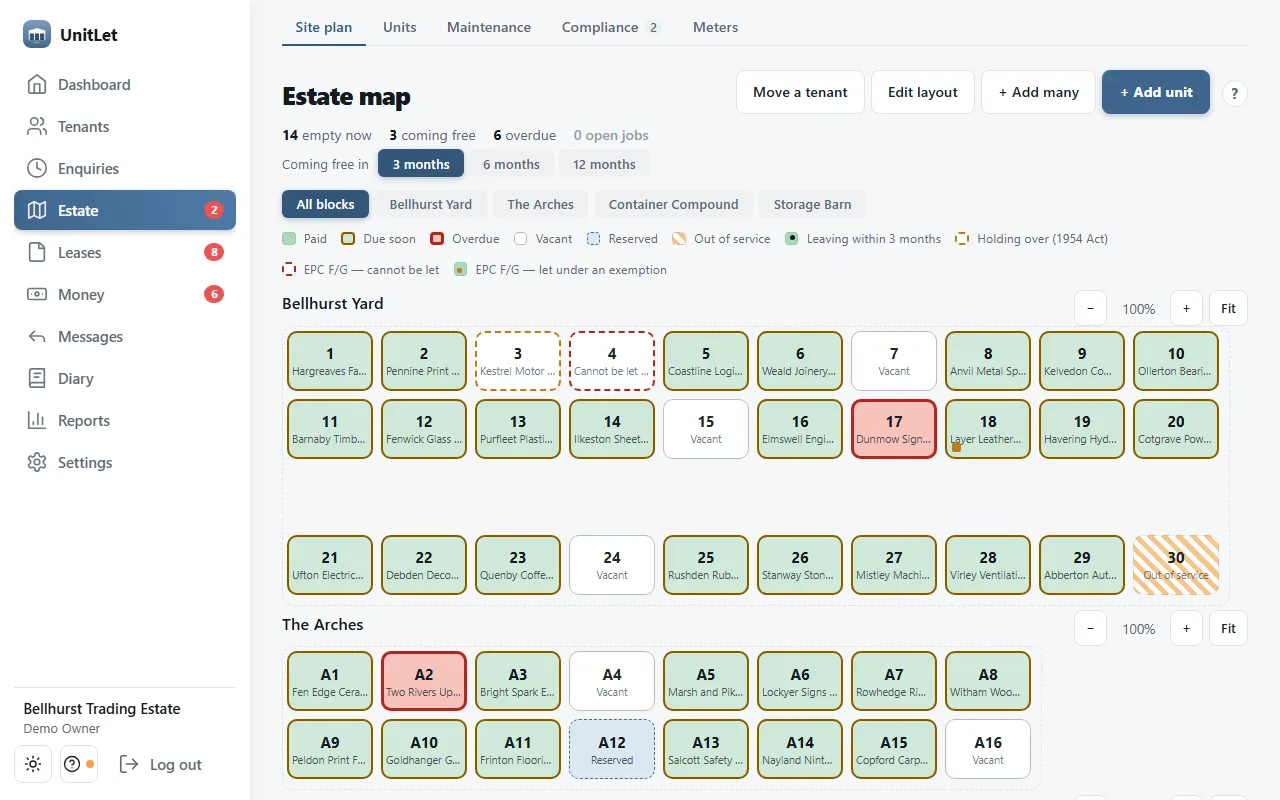
These are real screens from the demo estate, on a laptop. Nothing is mocked up, and it looks the same on a PC or a tablet.
-
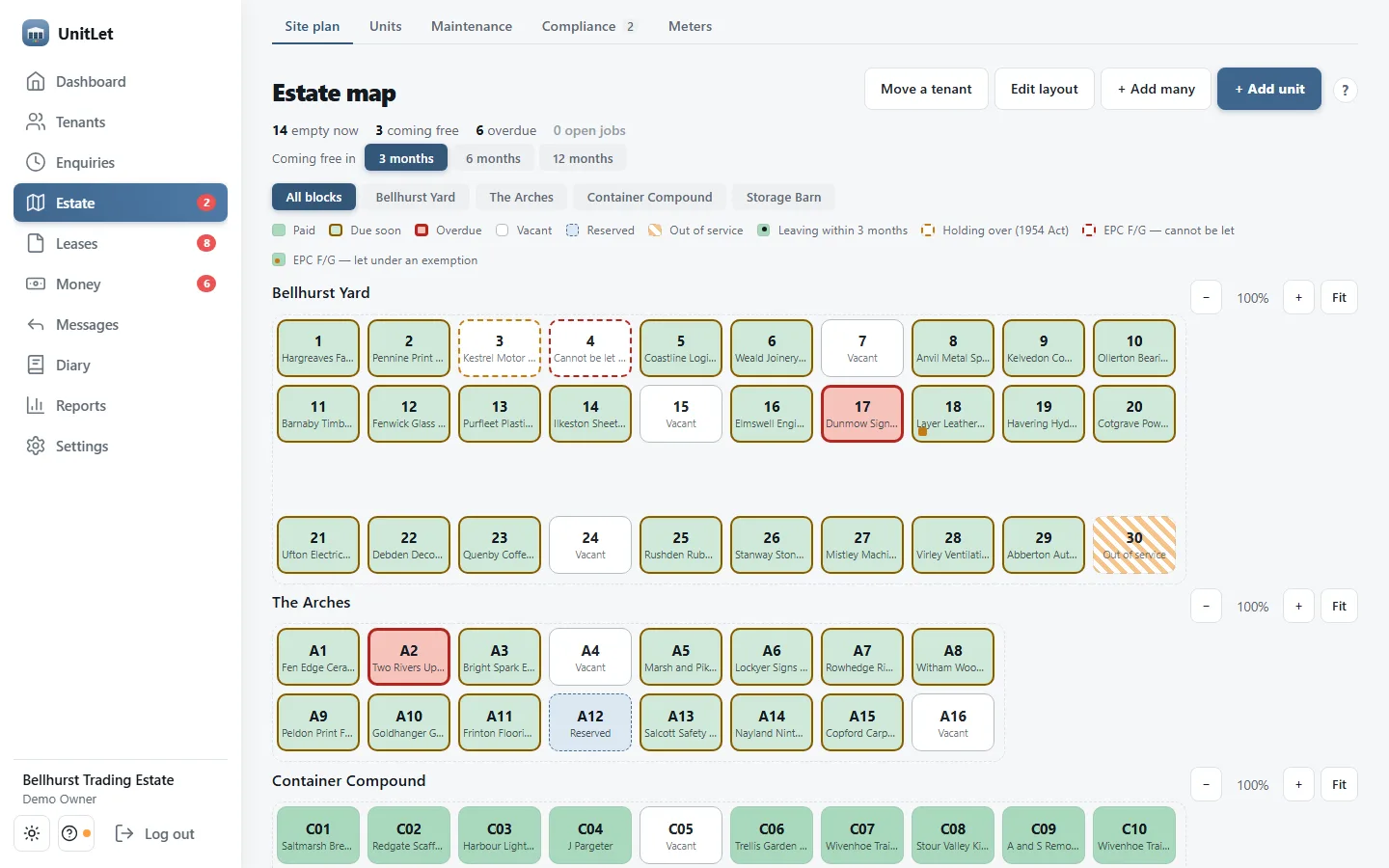
See the whole estate at a glance
Every unit on one plan, laid out in your own blocks: green is paid, amber is due soon, red is overdue, and vacant, reserved and out-of-service units are marked. Click a unit to see who's in it.
- Units coming free are flagged before they are
- A unit that can't lawfully be let says so on the map
-
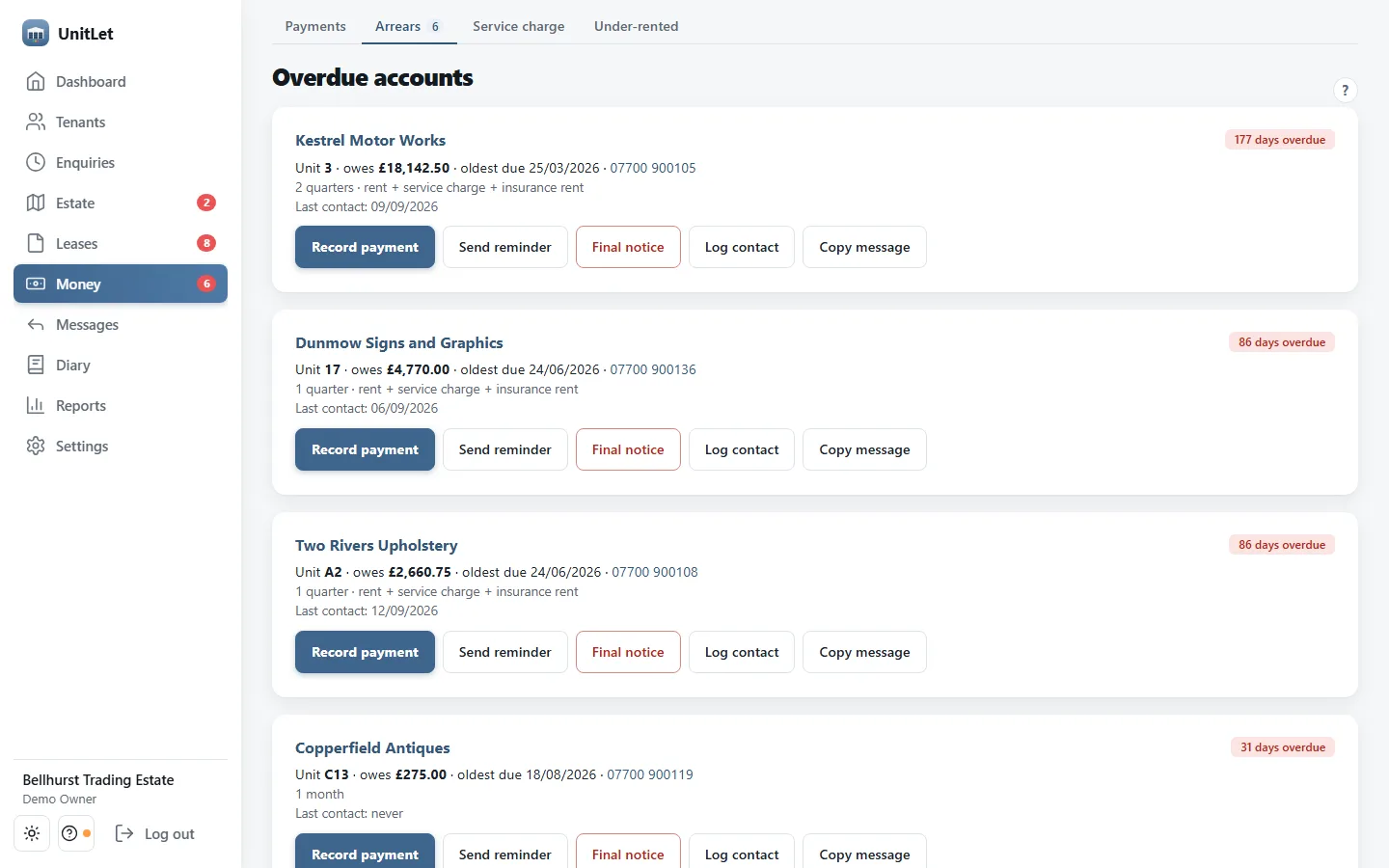
Chase what's owed in a couple of clicks
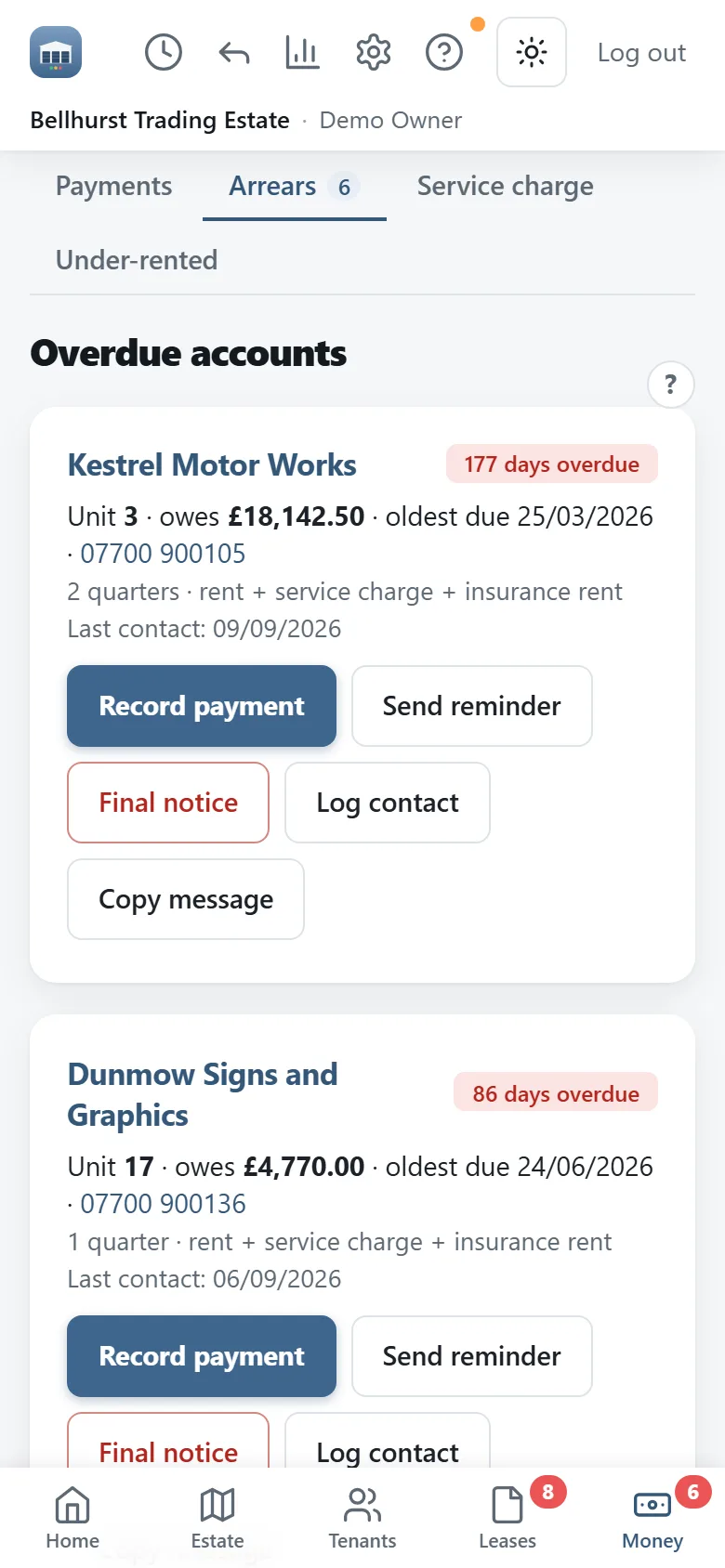
One list of everyone past their due date, with how late they are and what they owe. Send reminder opens the message already written, in your name, and notes on the record that you chased — so nobody gets asked twice by accident.
- A firmer final notice for the ones who ignore the first
- Copy the wording into a text or an email instead
- Record the payment from the same screen when it arrives
-
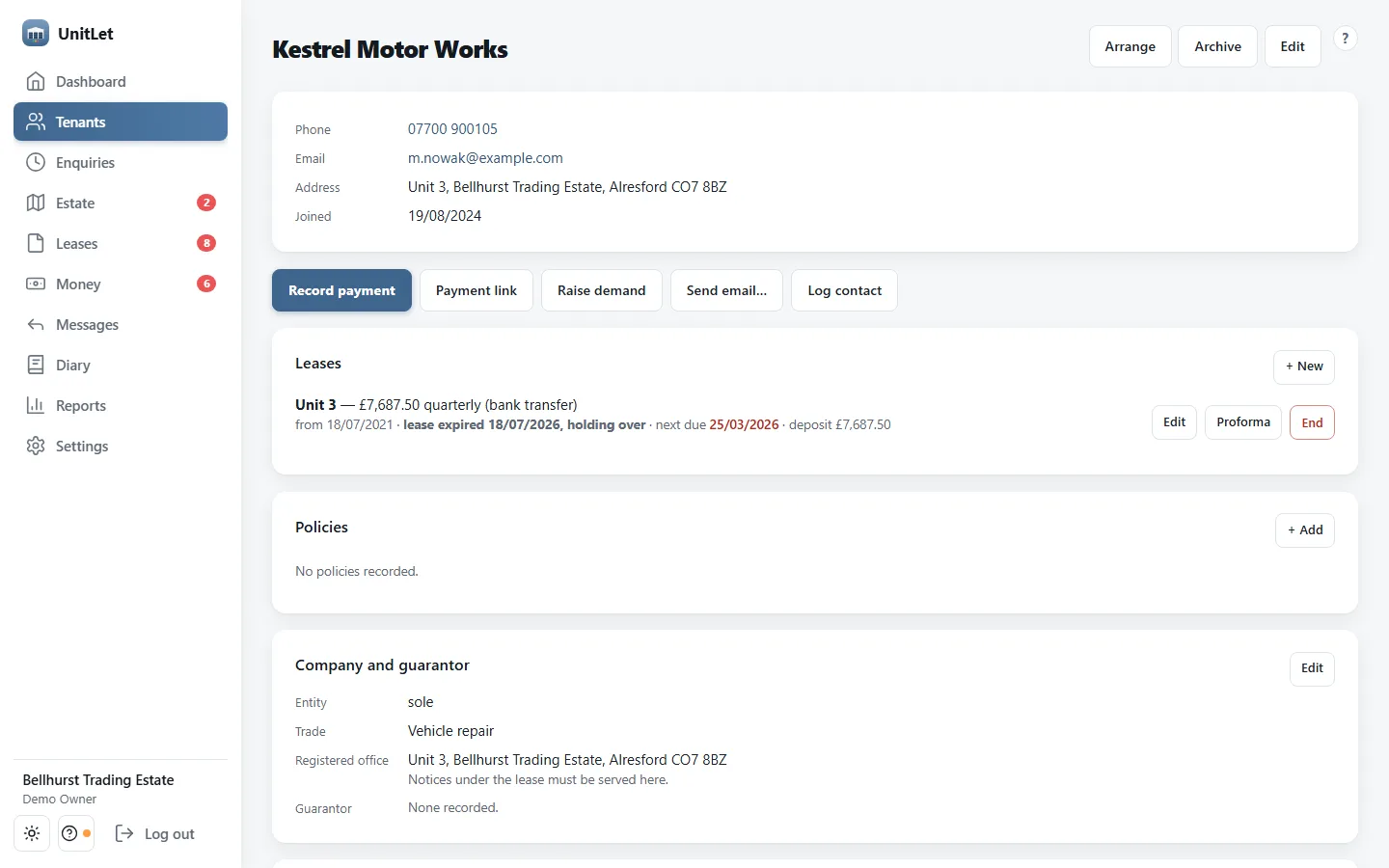
Everything about a tenant, in one place
Contact details, the unit they're in, their lease or licence with its rent, term and deposit, the company and any guarantor, plus payments, documents and every note anyone has made.
- Where notices under the lease have to be served
- Insurance policies and their expiry, chased before they lapse
-
Let it nag you, not the other way round
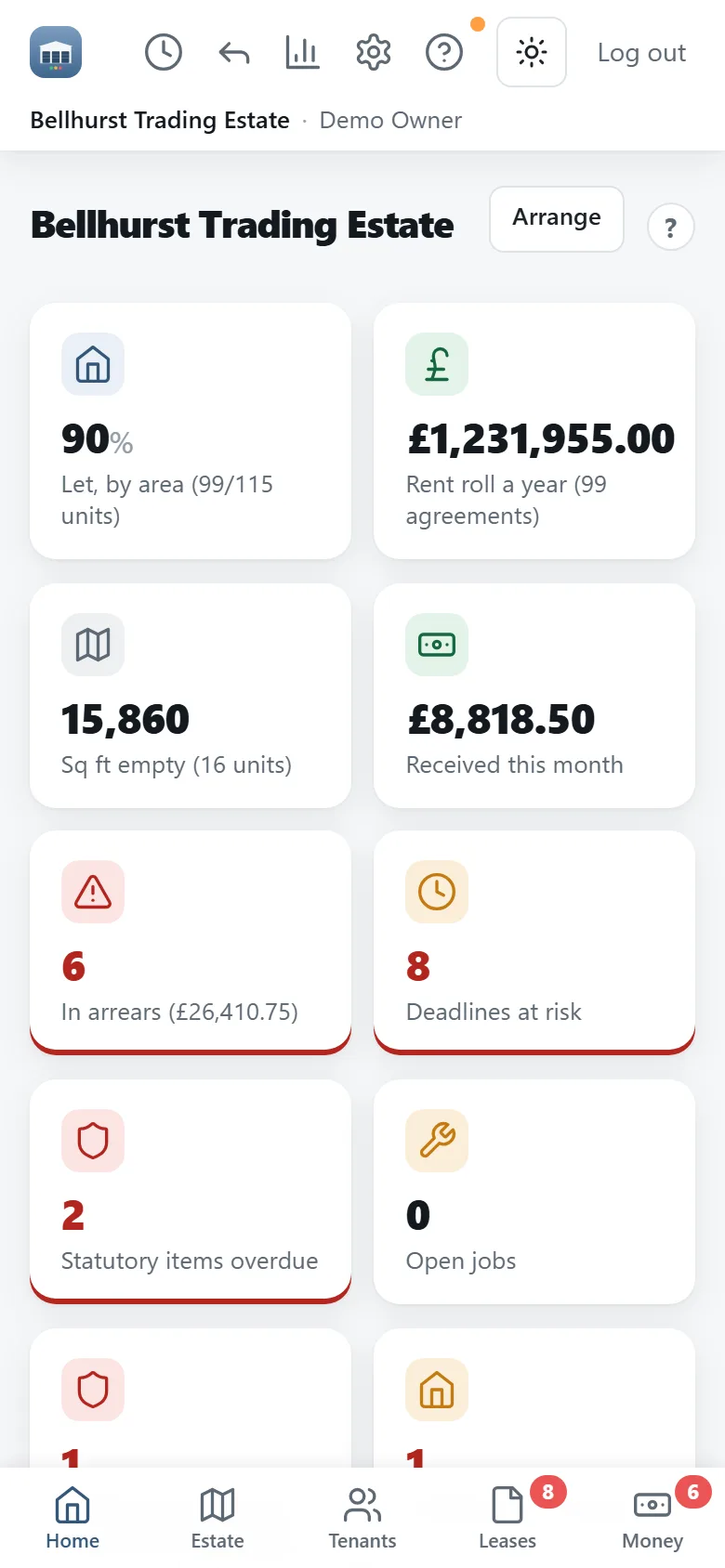
Open it in the morning and the dashboard has already worked out what needs you: what's let and what's empty, what's owed, which lease deadlines have gone past their notice date, which statutory inspections are overdue, and anything that can't lawfully be let.
Made for a proper screen.
The jobs that want a keyboard and room to see — a rent review, a service charge reconciliation, the report your lender asks for — are all there, laid out for a laptop or PC.
- What the estate is worth: passing rent against what was actually banked, and the reversion you aren't earning
- WAULT quoted twice, to expiry and to break — the second is the one a lender uses
- Service charge budgets, on-account demands and a year-end reconciliation per unit
- Exports your bookkeeper can bring into Xero or QuickBooks
- Up to five logins, with settings, billing and exports kept to owners and admins
The same work, picked up wherever you are.
A tablet gets the same full layout as a laptop, on the office desk or carried into a meeting with an agent. And the same account is on your phone when you're out on the estate — check who's in a unit, take a meter reading, record a payment at the gate, or log a job with a photo.
Made for a mixed site, not a single trade.
Every feature is in every account. The ones marked optional use an account of your own with another provider, and stay off until you switch them on.
A site plan that matches the site
Lay your units out the way they actually sit, in your own blocks. Colour tells you paid, due, late, empty or out of service in one look.
Rent, chased on its own
Demands go out before the money is due and again when it's late, by email or text, in your name, with replies coming back to you. The same reminder is never sent twice.
The paperwork that bites
Fire risk assessments, EICRs, asbestos, legionella, LOLER, gas and EPCs. UnitLet knows the intervals, lists what has never been recorded at all, and emails you before anything lapses.
Deadlines you can't undo
Break clauses, rent reviews and lease expiries — warned by the notice date, not the event date. A break that isn't operated in time can't be operated at all.
Leases and licences together
English quarter days, service charge, upward-only and index-linked reviews and dilapidations on the units that need them — and plain monthly licences on the ones that don't. Same estate, same screen.
Maintenance and meters
Log a job from your phone with a photo. Record ingoing and outgoing readings so the next tenant's bill starts where it should.
Card and Direct Debit Optional
Connect your own Stripe or GoCardless. The money goes straight to you, and a cleared payment updates the tenant's record by itself.
Enquiries matched to units
Keep the people asking for space. When a unit comes free, UnitLet suggests who on the list it suits — by size, by rate and by what they asked for.
A message to the whole estate
The gate code changes on Monday? Email or text every tenant, just the current ones, or everyone in arrears, in one go. Marketing messages get an unsubscribe link automatically.
A diary for the estate
What the agent said, when the gate code changed, who promised to clear the yard by Friday. Tie a note to a tenant or a unit, and give it a follow-up date.
Your team, with roles
Up to five logins. Staff get the day-to-day screens; settings, billing, backups, exports and estate-wide messages stay with owners and admins.
It's your data
Backed up every night. Download spreadsheets and a full backup from Settings whenever you like — and still, if you stop paying.
Why we built it.
UnitLet started as software for one caravan storage yard in Essex, because the alternative was a spreadsheet and a wall planner. Then the same site added containers. Then two workshop units on proper leases.
Nothing on the market handled all three. Self-storage software doesn't know what a rent review is. Commercial property software costs more per month than the containers earn and assumes you have a surveyor on staff. So we built the thing that does both, for the operator who is doing both — and who is, most days, also the person cutting the grass.
I build it, I support it, and if you email, you get me — not a ticket queue.
UnitLet is a product of Property Workflow Systems Ltd, a UK company, and is built in Essex. hello@unitlet.co.uk
One price per account. Everything included.
Try it free for 30 days — no card, nothing to cancel. No tiers, no add-ons, no limit on units or tenants.
Founding offer
£29 a month per account
For your first 12 paid months, then £39 a month. The free trial doesn't count towards the 12.
Start freeIs a founding place still open? Availability is confirmed at checkout, so you see your price before you pay anything. See everything that's included.
What operators ask first.
I only let containers. Is this overkill?
No. The lease machinery — rent reviews, service charge, dilapidations — stays switched off until you have something that needs it. What you see is units, tenants, rent and maintenance. It's there the day you add a workshop, and not before.
I have proper FRI leases. Does it really handle those?
Yes, and this is the part most storage software has never heard of. English quarter days, service charge budgets and year-end reconciliation, upward-only and index-linked rent reviews, break notices warned by the notice deadline, dilapidations, and whether a lease is contracted out of the Landlord and Tenant Act 1954.
What do I need to run it?
A laptop, PC, Mac or tablet with a web browser — there's nothing to install. It's designed for a proper screen in the office, and the same account works on your phone for when you're out on the estate; add it to your phone's home screen and it opens like an app. It needs an internet connection to save anything.
Can I get my data out?
Any time, in one click, as spreadsheets. There's also a nightly backup you can download or restore yourself. We think an export button you never need is the only honest way to sell software you keep somebody's business in.
What happens after the free trial?
It goes read-only, not away. You can still log in, look at everything and download your records — you just can't add or change anything until you subscribe. Nothing is deleted.
Do my tenants have to do anything?
No. Out of the box it's a tool for you and your staff; tenants just get well-timed demands and reminders from you. Card payments and Direct Debit are there if you want them, and off until you turn them on.
Do you take a cut of my rent?
No. One monthly subscription, that's the whole commercial relationship. If you take card payments we connect your own Stripe or GoCardless account and the money goes straight to you.
I run more than one estate. Two subscriptions?
A subscription covers one account, with its own web address and unlimited units. A property that needs its own name on its demands and letters is a second account, because an account has one.
Have a proper look round before you decide anything.
Start your free trial — 30 days with every feature switched on, and no card. Your estate gets its own web address as soon as you sign up.
Not ready yet? Email hello@unitlet.co.uk and tell us what you let — a human replies.